The forums › FAQ › How do you take pictures while in a room?
- This topic has 34 replies, 15 voices, and was last updated 11 years, 10 months ago by Lover.
-
AuthorPosts
-
August 18, 2014 at 8:06 pm #98529Anonymous
There are many, many, ways of “photographing” rooms but the question related to removing the HUD.
All your images show some component of it.
August 18, 2014 at 8:19 pm #98530I know Susan, That's what I said.
It is possible to crop the image in Paint to whatever you want.
I chose not to with these because I was not trying to hide who I was with and I wanted whole bodies as far as possible, but I (one) could crop the HUD right out.September 8, 2014 at 6:22 pm #98532I find it a hassle
to use so many programs to crop then upload it to other programs
then bring it here ….. Where a simple crop tool would be so useful here
maybe its time the start looking at a new why to taking photos in here achat
and getting a crop tool …..September 9, 2014 at 4:18 pm #98533What dose a HUD mean here
It means a housing Program for me.
lol blushing don't know what it means :-[September 9, 2014 at 7:53 pm #98534I've been PrintScrn ing for years… sometimes, but not on any of these examples, I paste it directly into Paint and crop it down to what I really want a picture of


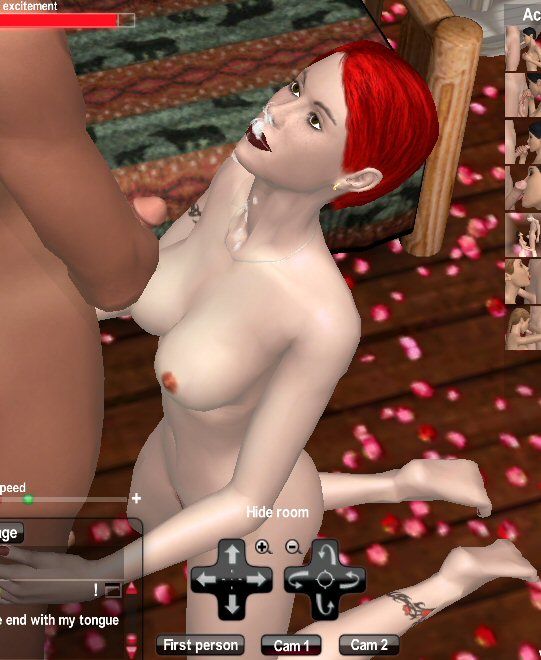
Thats what i do too
 October 1, 2014 at 10:11 pm #98535
A solution could be, they give us a “take pic mode”. A button, which blinds out everything but the HUD and takes a pic.
October 2, 2014 at 8:09 am #98536A solution could be, they give us a “take pic mode”. A button, which blinds out everything but the HUD and takes a pic.
I think this would be great and make it easy for every one I hope they can give us this ASP
October 2, 2014 at 9:27 am #98538I agree with Lover about a “snapshot button” in the game, important think is they must be automatically saved in a dedicate folder.
And about an easy way to upload game pictures here…….i wonder if Dev-Team is pondering about a way to load them here directly by ours HD
October 2, 2014 at 11:57 am #98539Please ask your partner(s) if it's ok to screenshot the room before doing so. Yes your subjects are only avatars but I still believe there should be some Etiquette used.
October 2, 2014 at 1:27 pm #98540Extremely valid point HGO.
Goes for use of chat logs too.
October 3, 2014 at 9:39 pm #98541Very important HGO, thanks for adding it.
December 1, 2014 at 8:50 pm #98542Hello , maybe this can be useful ..I use the PrintKey2000 programm to take pics in room..It s very easy to handle and it s perfect to select small parts or define exacty what you need.
You just need to download it…it runs in stand alone…define a hotkey ( i choose f9 ) and then select what you want to get saved
It saves it directly on your computer..don t need to upload it in paint or gimp..etc..
Here is a link to download it from a german platform which i trust..( the app is in english ) but i m sure you can find it searching in google even on other platforms
http://www.chip.de/downloads/PrintKey-2000_42776002.html
unfortunatly i can t upload a picture to show..it says the upload folder is full
Have funDecember 2, 2014 at 2:09 am #98543:-[ i have tried , but seem unable to take pictures in room at all ,for some reason.i do not under stand.why. :'(
December 2, 2014 at 5:25 am #98544I am Happy with Gimp it is easy and fast ,
I like easy Hope the do a update on making it easy to taking photos here and maybe
having a gallery for us to save our photos from our rooms ..December 2, 2014 at 7:27 am #98545kerryane, it may be that you have the game on full screen, I have noticed that I can't when I'm on full screen, so maybe if you try it in a window and see? xx
-
AuthorPosts
- You must be logged in to reply to this topic.
You can browse and read existing discussions and old posts.
Creating new topics and posting replies has been disabled.
The forums › FAQ › How do you take pictures while in a room?